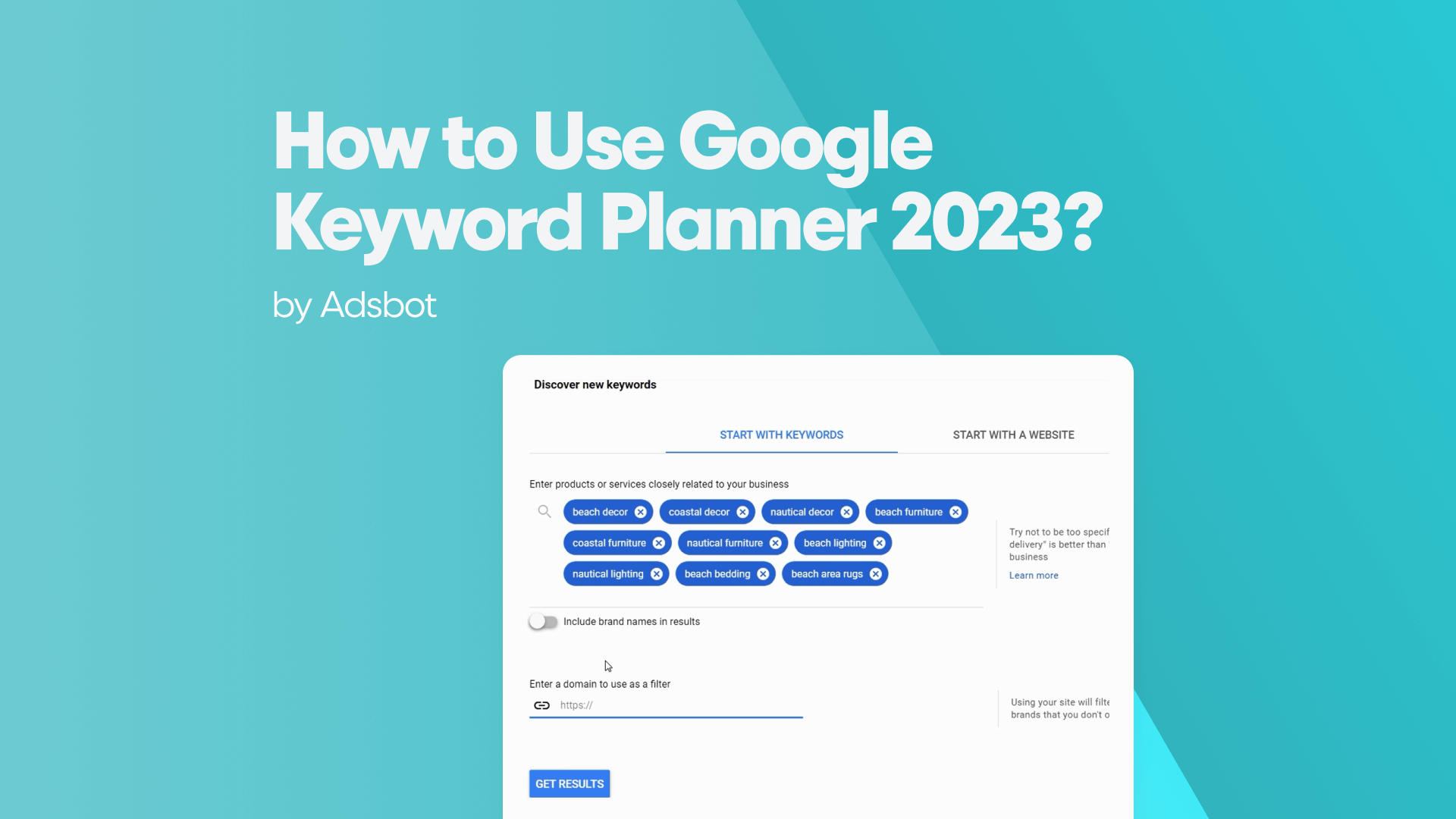
Google Keyword Planner is a research tool within Google Ads that helps users find the most effective keywords for their marketing campaigns. It provides data on search volume and estimated costs to show how popular and competitive specific terms are. This tool allows advertisers and content creators to plan their strategies based on what their audience is actually searching for.
Google Keyword Planner (GKP) is often reduced to a basic volume-checking tool, but in the age of generative AI, it must be reimagined as an engine for predictive audience modeling. Search behavior has fractured across platforms like TikTok and ChatGPT, making Google’s raw intent data more critical than ever for understanding what users actually want, not just what they type.
We are navigating a Great Decoupling where high rankings no longer guarantee traffic. AI Overviews now dominate nearly half of all queries, absorbing clicks that used to go to websites. Survival now depends on high-intent visibility rather than broad volume.
This guide provides a keyword research checklist and a veteran’s roadmap to mastering GKP. We will move beyond standard metrics found in resources like The Google Ads Keyword Guide to focus on extraction-ready content: strategies designed to ensure your brand is prioritized and cited by the generative models that now control the digital gateway.
How to Set Up Google Keyword Planner?
To execute these advanced strategies, you must first bypass the training wheels Google applies by default. The standard Smart Mode interface obscures the granular data needed for predictive modeling, reducing a powerful engine to a simple suggestion box.
Your first step is confirming your account is in Expert Mode. Without this switch, you lose access to the raw metrics; search volume trends, bid estimates, and competition indexing that inform high-intent decisions. If your dashboard looks simplified or lacks a top navigation bar, switch immediately to unlock the full “Tools and Settings” menu.
Next, address the billing gateway. While the Keyword Planner is technically free, access to specific features like “Discover new keywords” and exact volume data often requires a fully configured Google Ads account. You do not need to run active campaigns, but you must complete the billing setup to verify you are a legitimate entity. This small barrier to entry filters out casual bots, ensuring the data you receive is cleaner.
Once inside, shift your mindset from syntax to signal. We are no longer just looking for strings of text; we are configuring the tool to ingest your first-party data (like email lists) to model Lookalike audiences, turning GKP from a passive dictionary into an active signal hunter.
How to Find New Keyword Ideas?
With the tool configured for active signal hunting, we move from setup to strategy. The most common error I see among novices is the single seed limitation, entering one obvious keyword like “CRM software” and expecting the tool to do the thinking. In the current landscape, this yields generic, high-competition results that everyone has already targeted.
To uncover the hidden pockets of intent, you must apply the Query Fan-Out. This involves entering up to ten disparate seed keywords that represent different stages of the user’s psychological journey, simultaneously. For a CRM tool, you wouldn’t just type “CRM”; you would input “sales team burnout,” “customer retention metrics,” and “Excel alternative.” This forces Google’s algorithm to triangulate the relationship between these concepts, surfacing the connective tissue keywords that exist in the gaps. These are often high-intent, solution-aware queries that single-word searches miss completely.
However, the most potent discovery method leverages the Start with a Website function. Rather than guessing keywords, let your competitors do the work. Input the URL of a rival’s high-performing blog post or pricing page to analyze competitor keywords that Google associates with their content. GKP will scrape that page and reveal the exact keyword ontology. For a truly modern edge, paste the URL of an industry podcast transcript. Because podcasts are conversational, GKP will extract natural language queries, the exact “who, what, where” phrasing that users speak into voice search and AI interfaces. This is competitive intelligence without the subscription cost.
Finally, you must apply Domain Filtering to purify this influx of data. Discovery is useless without relevance. If you are a high-end B2B consultant, high-volume terms related to “free templates” or “student jobs” are actively harmful to your conversion rates. Use the filter to exclude terms that do not align with your specific commercial intent. This step is critical for Topical Authority; by refusing to rank for irrelevant terms, you signal to Google exactly who you are, ensuring your content is served only to the users most likely to convert.
How to Understand Keyword Metrics?
Keyword metrics are specific data points used to evaluate the performance and potential value of search terms. These measurements show you how popular a keyword is, how difficult it is to rank for, and how likely it is to lead to a conversion. Key examples include monthly search volume, competition level, and cost-per-click, which help marketers decide which words to target.
With a purified list in hand, the challenge shifts from discovery to decoding. Google’s native metrics are designed for advertisers, not publishers, creating a false friend scenario where standard terminology leads to strategic errors.
First, address the Search Volume opacity. Unless your account has active ad spend, GKP presents broad ranges (e.g., 1k–10k) rather than precise figures. Do not view this as a defect. In an AI-driven landscape, these ranges smooth out volatility. We are looking for consistent demand tiers, not exact hit counts. A keyword holding a steady 1k–10k baseline over 12 months is a reliable pillar for content, whereas a spike to specific numbers often signals a fleeting trend that may vanish before you rank.
The critical distinction, however, is the Competition column. Misinterpreting this metric is the single most common cause of failed SEO campaigns. In GKP, Competition indexes PPC bidding density (a core component of PPC keyword research), not organic difficulty. A keyword marked Low simply means few advertisers are bidding on it, often because it is purely informational. However, purely informational queries are often the hardest to rank for organically, as they are dominated by legacy Wikipedia entries or government sites. Do not confuse a lack of ads with an open door.
To find the true commercial vein, look to the Top of page bid columns. This is the only metric that puts a dollar value on intent. If a keyword has low volume but a high range bid of $40, the market has validated that this user is ready to buy. These are your high-value targets. Prioritize terms with measurable bid activity, even if volume seems negligible; this price tag is the market’s proof that the user behind the query has a wallet in hand.
How to Use AI for Keyword Research?
While bid metrics reveal current value, they are inherently backward-looking. To future-proof your strategy, you must pivot to the predictive capabilities unlocked by Google’s integration of Gemini AI. This evolution transforms the tool from a historical archive into a forecasting engine, capable of spotting intent shifts before they manifest as visible volume.
The most significant application here is capturing Conversational Intent. As search behavior migrates to Ask Me Anything interfaces, users have abandoned keywords for complex, multi-turn prompts. A query is no longer just “CRM software”; it is “best CRM for a 10-person sales team with a limited budget.” You must use the Planner to identify these natural-language strings. By targeting these phrase patterns, you align your content with the linguistic triggers of AI Overviews, ensuring your brand is the answer cited when users are in chat mode.
This predictive power also serves as a defensive moat for regulated industries. In sectors like fintech or healthcare, compliance is a keyword attribute. The AI-enhanced filters can now better detect nuances that might trigger regulatory flags, such as terms implying guaranteed returns or medical cures. By filtering these out at the research stage, you build a content roadmap that is not only high-intent but legally durable, protecting your domain from algorithmic demotion due to Your Money or Your Life (YMYL) violations.
How to Optimize for AI Overviews?
AI Overviews are AI-generated summaries that appear at the top of search results to answer complex questions instantly. This feature gathers information from multiple web sources to provide a single, concise explanation of a topic. The goal is to give users a complete answer directly on the result page without needing to visit several websites.
With a predictive list of safe, high-intent keywords in hand, the final hurdle is ensuring your content is legible to the engines that now mediate the user experience. We are witnessing the rise of Generative Engine Optimization (GEO), where the goal is not just to rank on a list, but to be cited as the single source of truth in an AI Overview (AIO).
Data confirms that 99.2% of AI Overviews are triggered by informational intent, specifically queries averaging five words or more. The Keyword Planner is your best tool for uncovering these problem-solving strings. You are no longer looking for short-tail volume; you are hunting for the specific phrasing of complex user problems. When you see a long-tail query like “how to calculate customer acquisition cost for saas,” that is a prime candidate for an AI citation.
However, targeting the right keyword is useless if your content structure prevents extraction. To win in GEO, you must adopt extraction-ready formatting. AI models prioritize content that is modular and direct. When targeting these five-word queries, place the core answer immediately in the first 100 words of your section. We call this the BLUF (Bottom Line Up Front) method. By providing a concise, definitional answer upfront, you increase the probability of your text being lifted directly into the AI snapshot.
Finally, you must insulate your content against the commodity trap. AI can generate generic advice instantly; it cannot generate lived experience. This is where the specific Experience component of E-E-A-T becomes your ranking survival mechanism. When you select a keyword from GKP, ask yourself: “Do I have unique data or a personal case study for this?” If the answer is no, the keyword is vulnerable. To secure your citation, you must back your keywords with non-textual signals: original screenshots, proprietary datasets, or first-hand anecdotes that a Large Language Model cannot hallucinate. This grounding makes your content the safe, verifiable choice for Google’s algorithms to serve.
How to Find Advanced Keyword Opportunities?
Advanced keyword opportunities are specialized search terms that usually have lower search volumes but demonstrate a high level of user intent. These phrases target specific needs or niche audiences, often resulting in less competition from other websites. Mastering low competition keywords is essential for capturing this specialized traffic. Identifying these hidden terms helps businesses connect with qualified visitors who are ready to make a decision or purchase.
With your content strategy grounded in verifiable experience, the final step is architectural. Individual keywords, no matter how authoritative, fail if they exist in isolation. To dominate a competitive niche, you must organize these terms into Semantic Clusters.
This requires moving away from the antiquated Single Keyword Ad Group (SKAG) mentality. Modern authority is built on Single Theme Ad Groups (STAGs). Instead of creating fragmented pages for slight variations like “SaaS CRM” and “Cloud CRM,” group them into one comprehensive resource. This signals to Google that you are the definitive authority on the concept, not just a manipulator of the keyword. GKP facilitates this by letting you Group keywords automatically. Use this feature to visualize the thematic pillars of your site rather than just a list of phrases.
However, the true mark of a veteran strategist is how they handle data gaps, specifically, the Zero-Volume Opportunity. GKP often reports 0-10 monthly searches for highly specific, long-tail technical queries. Novices ignore these; experts aggressively target them. These ghost terms often represent high-value decision-makers searching for niche solutions (e.g., specific API integration errors or enterprise compliance protocols). Ranking here means capturing leads with nearly 100% conversion intent before competitors even realize the topic exists. You are essentially betting on the future value of the query.
Finally, leverage the Forecasts tool to master timing. Authority is temporal. If GKP predicts a seasonal spike in “Q4 budget planning” for October, you must publish your content in August. By establishing your URL history and internal links weeks before the trend peaks, you ensure your content is the incumbent resource when the wave of traffic finally breaks, effectively pre-ranking for the inevitable demand.
Conclusion
Ultimately, mastering Google Keyword Planner is not about memorizing button clicks; it is about adopting the mindset of a Relevance Engineer. You are no longer just hunting for volume; you are building an interconnected ecosystem of answers that mirrors the complexity of human intent.
The tools for predictive modeling and zero-volume targeting are powerful, but they are static without execution. Search is a living organism, constantly evolving with every AI update. Your strategy must be equally dynamic. Commit to a weekly rhythm of review, adapt to the algorithmic currents, and use this data not just to rank, but to dominate the conversation before it even begins.
Frequently Asked Questions (FAQ)
How to use Google Keyword Planner step by step?
- Log in: Access your Google Ads account and click the “Tools” icon in the menu.
- Select: Under “Planning,” choose “Keyword Planner.”
- Choose Mode: Select “Discover new keywords” to find ideas, or “Get search volume” if you already have a list.
- Enter Inputs: Type your seed keywords or paste a competitor’s URL into the “Start with a Website” tab.
- Analyze: Review the results, paying attention to the “Top of page bid” columns rather than just volume.
- Export: Select your chosen keywords and download them as a CSV or Google Sheet for your content plan.
Is Google’s Keyword Planner free?
Yes, Google Keyword Planner is 100% free to use. However, Google requires you to set up a Google Ads account to access it. While they may ask for billing information during setup to verify your identity, you do not need to spend money on ads. You can create an account in “Expert Mode” and skip the campaign creation step to access the tool without paying a cent.
What is the use of Google Keyword Planner?
Its primary use is to reveal the voice of the customer. Unlike third-party tools that estimate data, GKP pulls directly from Google’s own database. Marketers use it to:
- Identify Intent: See exactly what users are typing into the search bar.
- Forecast Demand: Understand seasonal trends and volume spikes.
- Validate Profitability: Use bid costs to determine if a keyword attracts buyers or just browsers.
Which is better, SEMrush or Google Keyword Planner?
It depends on your goal. Google Keyword Planner is superior for raw, first-party data and local SEO, as it comes directly from the source. SEMrush is better for competitive intelligence, as it allows you to spy on the exact keywords your competitors are ranking for, something GKP cannot do directly. Think of GKP as your raw data source and SEMrush as your strategic analysis tool; veterans often use both.
How to use Keyword Planner effectively?
To move beyond basic results, stop treating it like a dictionary.
- Use the “Start with a Website” feature: Paste a competitor’s URL to see their keyword map.
- Fan Out: Enter 5-10 distinct variations of your topic to force the AI to find the middle ground keywords.
- Filter Aggressively: Exclude terms with low commercial intent (e.g., “free,” “jobs”) to protect your conversion rates.
How to use Google Keyword Planner without creating a campaign?
The secret lies in the setup. When creating a new Google Ads account, do not follow the main prompts.
- Click “Switch to Expert Mode” (often a small link at the bottom).
- Look for the small link that says “Create an account without a campaign.”
- Confirm your business info (currency/timezone).
- You will be taken directly to the dashboard, where you can access the Planner under “Tools,” bypassing the requirement to set up an active ad.
Author:

Get 3x more revenue from the same ad spend.
Let our onboarding experts show you the power of AI-driven PPC optimization.
Start scaling today
Popular Posts
-
 How Many Keywords Should Be In an Ad Group in Google Ads?
For the vast majority of modern campaigns, the ideal number…
Read more -
 Google Ads Script for Dummies: An Introduction
Imagine you have an e-commerce website that sells licensed superhero…
Read more -
Google Ads Sitelink Character Limits
Your Google Ads are cutting off in the middle of…
Read more -
What Is Conversion Value in Google Ads?
What if you could put a price tag on every…
Read more

Register for our Free 14-day Trial now!
No credit card required, cancel anytime.