
A keyword match type is a setting that controls how strictly a user’s search must match your chosen keyword for an ad to show. It allows advertisers to define how much variation in spelling or meaning is acceptable when targeting potential customers. By selecting Broad, Phrase, or Exact match, you determine the balance between reaching many people and targeting specific needs.
If you are still managing your Google Ads keywords based on literal character strings, you are fighting a losing battle against the machine. The era of syntax-based targeting, where specific words triggered specific ads, is effectively over. In my 15+ years managing paid search, I have never seen a more fundamental shift than the move from text matching to semantic orchestration.
Today, the Google Ads retrieval system is powered by advanced Large Language Models (LLMs) like BERT and Gemini. These models do not just read keywords; they understand intent. With 15% of daily searches being brand new queries that have never been seen before, a rigid, syntax-heavy account structure simply cannot keep pace. The system now looks at the context of the search, the user’s location, and their recent history to determine if your keyword is a relevant match, regardless of whether the words spell out a match.
To succeed in this environment, you must stop viewing match types as strict filters and start viewing them as signals. A broad match keyword is no longer a cast-a-wide-net tactic; it is a signal to the AI to explore high-value opportunities based on conversion data. Understanding this distinction is the difference between wasting budget on irrelevant clicks and scaling a profitable account.
Of course, match types are only half the battle. To build a truly robust strategy, you must first understand the different types of keywords: informational, navigational, and transactional, which match types are designed to capture. Knowing whether a user is looking to “learn” or “buy” allows you to select the right match type for the job.
This guide moves beyond the basic definitions found in The Google Ads Keyword Guide. We will explore how to strategically deploy match types to guide Google’s machine learning, ensuring you capture intent, not just keystrokes.
Keyword Match Types
While the underlying technology has evolved, the interface for controlling it remains familiar. There are three primary match types available to advertisers, each distinguished by specific punctuation (syntax). However, their behavior is now defined by how strictly they adhere to the meaning of your keyword rather than the spelling.
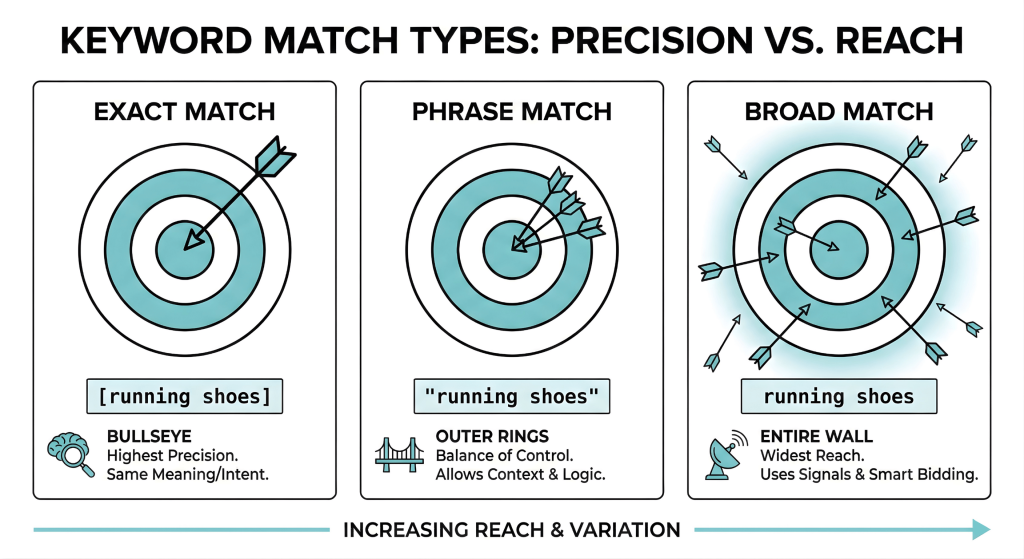
Think of these match types like a game of darts.
Exact Match
Exact match is a keyword setting that triggers your ad only when a search query matches the exact meaning of your keyword. It provides the highest level of control by ensuring ads appear only for highly relevant searches. This setting is ideal for targeting specific user intent while minimizing wasted budget on unrelated traffic.
- Syntax: Square brackets (e.g., [running shoes])
- This is the bullseye. It offers the smallest target area but the highest precision.
Historically, Exact Match meant the user had to type your keyword letter-for-letter. Today, it means the user’s search must match the same meaning or intent as your keyword. This is a critical distinction. If your keyword is [lawn mowing service], your ad can be triggered by the search “grass cutting company near me.” Even though the words are completely different, the intent is identical.
Use Exact Match when you need absolute control over the concept you are bidding on. It creates the tightest guardrails for the AI, ensuring budget is only spent on users who have explicitly demonstrated the specific intent you are targeting.
Phrase Match
Phrase match is a keyword setting that displays your ad when a search includes the specific meaning of your keyword. It allows additional words to appear before or after your phrase, provided the user’s intent remains relevant to your offer. This match type serves as a middle ground, balancing the strict control of exact match with the wider reach of broad match.
- Syntax: Quotation marks (e.g., “running shoes”)
- This represents the outer rings of the dartboard. You are still aiming for a specific area, but there is more room for variation.
Phrase Match serves as the bridge between the precision of Exact and the reach of Broad. It matches searches that include the meaning of your keyword, but allows for additional context before or after the core concept. Crucially, it respects the logic of the phrase. For example, the keyword “moving services NYC to Boston” will match users looking to move in that specific direction, but should not match users looking to move from Boston to NYC, because the directionality changes the meaning.
This match type now incorporates the behavior of the retired Broad Match Modifier, offering a balance of volume and control for mid-funnel research queries.
Broad Match
Broad match is a keyword setting that triggers your ad for searches related to the meaning of your keyword, even if the specific words differ. It leverages machine learning to match ads with synonyms, misspellings, and related concepts based on user intent. This option provides the widest reach, helping advertisers discover new search trends and capture relevant traffic they might not have explicitly targeted.
- Syntax: No punctuation (e.g., running shoes)
- This is the entire wall. It captures everything the other match types miss, but requires a skilled hand (Smart Bidding) to ensure you don’t just hit the drywall.
Broad Match is the only match type that looks beyond the search query itself. It utilizes a vast array of signals, including the user’s previous search history, their physical location, and the content of your landing page, to predict relevance.
A Broad Match keyword for running shoes generally won’t match “running shoes” exclusively. It might match “training for a 5k,” “best sneakers for cardio,” or “footwear store open now.” The system infers that these users are related to your keyword’s intent. Because it casts such a wide net, Broad Match is strictly recommended for use with automated bidding strategies that can filter out low-value impressions in real-time.
Why Syntax Matching Is Important?
Syntax matching is a search method that connects a user’s query to a keyword based on the exact arrangement of characters and words. It requires the search terms to mirror the advertiser’s keyword list precisely, ignoring the intent behind the search. This traditional approach relies on literal text strings rather than the contextual meaning of the user’s request.
The death of syntax matching wasn’t a sudden policy change; it was a technological necessity driven by the integration of BERT (Bidirectional Encoder Representations from Transformers) into Google’s core search algorithm.
Before BERT, search algorithms were largely linear. They read queries from left to right, often missing the nuance created by prepositions like “to” or “for.” A search for “flight from NY to London” might have been treated similarly to “flight from London to NY” simply because they shared the same keywords. This limitation forced advertisers to build exhaustive keyword lists (e.g., “plumber,” “plumbers,” “plumbing,” “fix sink,” “sink repair”) to capture every possible variation a user might type.
BERT changed the game by analyzing words bidirectionally. It looks at a word in relation to all other words in the sentence simultaneously, rather than in sequence. This allows the system to understand the contextual relationship between words, effectively solving the problem of polysemy (words with multiple meanings) and complex conversational queries.
This semantic capability is a game-changer for capturing long-tail keywords. Previously, you had to guess every specific, multi-word phrase a user might type to find your product. Now, the AI connects the dots, allowing you to capture these high-value, specific queries via semantic matching without cluttering your account with thousands of low-volume variations.
Intent vs. String
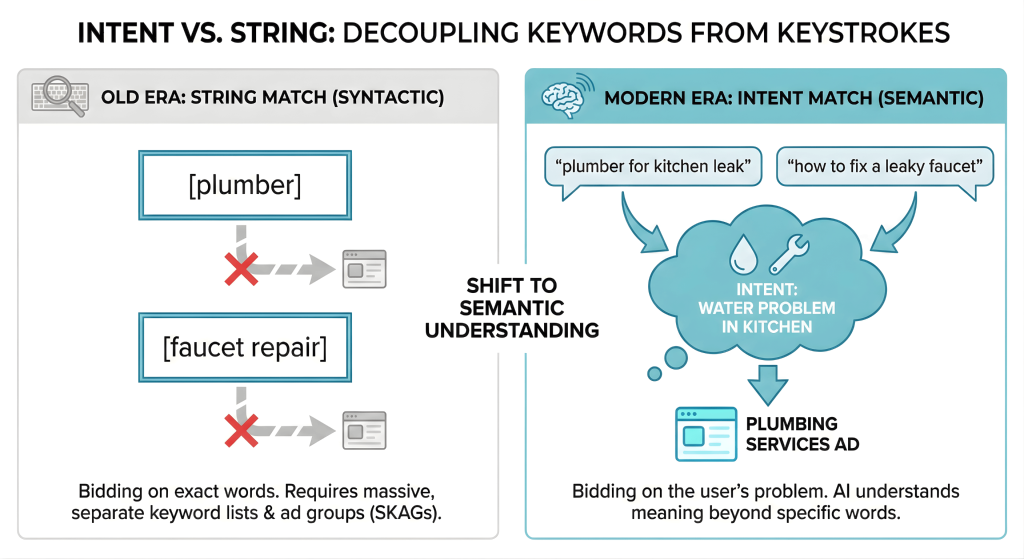
This shift decouples the advertiser’s target from the user’s keystrokes. Consider two search strings that look completely different:
- “how to fix a leaky faucet”
- “plumber for kitchen leak”
Syntactically, these strings share almost no common vocabulary. In the old era, you would need separate ad groups and keywords for “faucet repair” and “plumber.” However, semantically, the intent is highly correlated: both users have a water problem in the kitchen and need a solution.
Modern Broad Match, powered by this understanding, recognizes that if you sell plumbing services, you are relevant to both queries. It doesn’t need the word “plumber” to be present in the user’s search to know that a plumber is the solution to a “leaky faucet.”
This is why skags (Single Keyword Ad Groups) and massive exact-match lists are becoming obsolete. You are no longer bidding on strings; you are bidding on the problem the user is trying to solve. When you restrict your campaigns to Exact Match only, you are essentially telling the AI: “Only show my ad if the user describes their problem using these specific words.” In a world where 15% of searches are brand new every day, that strategy is a recipe for irrelevance.
Broad Match and Smart Bidding
If Broad Match is the engine that drives reach, Smart Bidding is the steering wheel. Attempting to run Broad Match with manual bidding, or even Enhanced CPC, is professionally reckless. You are asking Google to find “related” searches but providing no algorithmic guardrails to judge the quality of that traffic. The result is inevitably wasted budget on irrelevant clicks.
The synergy between these two technologies is mandatory. Broad Match provides the reach, scanning the vast ocean of daily searches to find relevant queries you didn’t anticipate. Smart Bidding provides the rigor, analyzing distinct signals at auction time (device, location, browser, audience data, and time of day) to calculate the precise probability of a conversion. If the probability is low, Smart Bidding bids down or sits out, even if the keyword matches.
This dynamic renders the old hyper-segmented account structures obsolete. For a decade, we were taught to isolate match types to control costs (e.g., Alpha/Beta structures). Today, that isolation creates data scarcity. Algorithms thrive on data density. When you split match types into separate ad groups or campaigns, you fracture the conversion data. The algorithm has to learn separately for your Exact campaign and your Broad campaign, doubling the learning curve and reducing efficiency.
By consolidating match types into unified, thematic ad groups, you feed the algorithm a richer dataset. It learns that the user searching for “enterprise software” (Broad) shares behavioral traits with the user searching for [b2b software solutions] (Exact), applying insights across the board instantly.
With this broader reach comes the need for dynamic relevance in your creative. Many advertisers utilize keyword insertion to ensure that even when a Broad Match keyword triggers an ad for a slightly different query, the ad copy remains highly relevant to what the user actually typed. This bridge between a broad signal and a specific ad text is crucial for maintaining high Click-Through Rates.
The results of this pairing are statistically significant. Studies show that advertisers who switch exact match keywords to broad match, while simultaneously using Target ROAS, achieve an average 20% increase in conversion value. This uplift comes from capturing high-intent searches that strict syntax matching simply cannot see. Your role is no longer to micro-manage the bid; it is to maximize the data density so the machine makes the right decision.
AI Max, AI Overviews, and AI Mode
AI Max, AI Overviews, and AI Mode are advanced search features that use artificial intelligence to find customers without relying solely on keywords. These tools allow ads to appear within AI-generated summaries and conversational search results by analyzing user intent and context. They enable advertisers to capture complex, unpredictable search queries that traditional keyword lists often miss.
The evolution of search doesn’t stop at Broad Match. Google has introduced a suite of AI-driven features that move beyond keywords entirely, effectively creating a keywordless future for advanced advertisers. This is where the concept of AI Max comes into play.
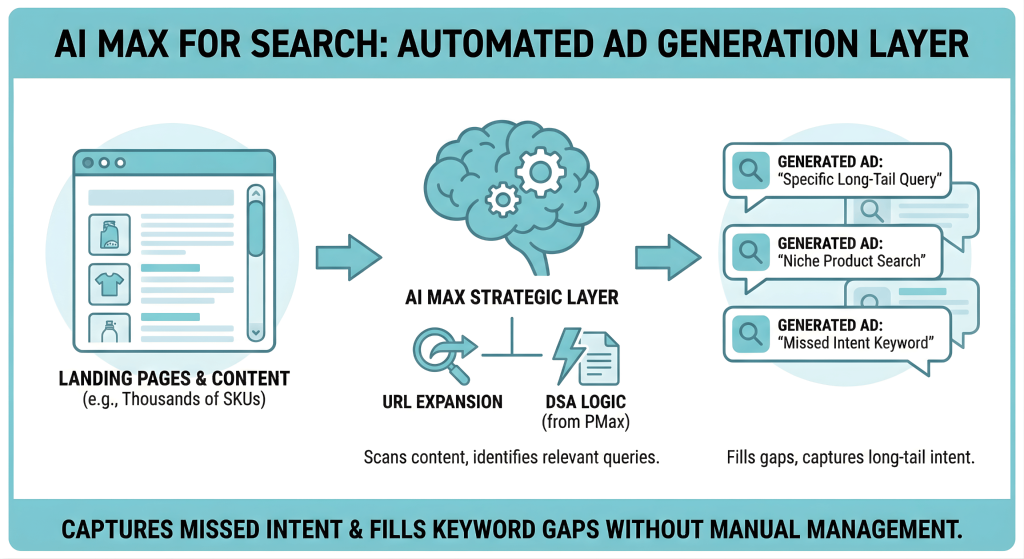
AI Max for Search is not a single setting but a strategic layer you apply to your Search campaigns. It leverages technology primarily found in Performance Max, specifically URL Expansion and Dynamic Search Ads (DSA) logic, within standard search campaigns. By enabling these features, you allow Google to scan your landing pages and generate ads for relevant queries that your keyword list, even with Broad Match, might miss. This is particularly powerful for large e-commerce sites with thousands of SKUs where managing individual keywords is impossible. It fills the gaps between your keywords, capturing long-tail intent that is too specific to bid on manually.
Then there is the visible shift in the SERP itself: Ads in AI Overviews. As Google rolls out AI Overviews (formerly SGE), users are seeing AI-generated summaries at the top of search results. Ads now appear directly within or below these summaries. Here is the critical operational detail: you cannot explicitly target these placements with Exact Match keywords. Google’s documentation and early observations suggest that Broad Match and Performance Max campaigns are the primary vehicles for entering these auctions. If you are clinging to legacy Exact Match structures, you are effectively opting out of the most premium real estate on the modern search results page.
Finally, we are seeing the rise of AI Mode: an interactive, conversational search experience. Unlike the static query-response model of the past, AI Mode allows users to refine their search through dialogue. Ads in this environment are not just placed; they are suggested contextually. If a user asks the AI to “plan a dinner party,” an ad for a catering service might appear when the conversation shifts to food options. Success here relies entirely on having robust creative assets and broad signaling. The AI needs to understand what you sell (via your assets) to recommend you in the flow of conversation, as there is no specific keyword to trigger the impression.
Brand Inclusions and Brand Exclusions
Brand lists allow advertisers to control when their ads appear for searches related to specific company names. Brand inclusions restrict traffic so ads only show for queries matching selected brands, while exclusions prevent ads from appearing for unwanted brand searches. These tools help manage traffic quality by explicitly targeting or blocking brand-related intent.
One of the most persistent fears about adopting Broad Match is the loss of control, specifically, the fear that your ads will appear for competitors or irrelevant variations of your name. To mitigate this, Google has decoupled match types from brand management, introducing two powerful governance tools: Brand Inclusions and Brand Exclusions.
Brand Inclusions are designed specifically for your Brand Protection campaigns. Previously, capturing every variation of your brand name required exhaustive lists of misspellings. Now, you can enable Broad Match keywords but apply a Brand List as an inclusion setting. This instructs the AI to utilize Broad Match’s semantic understanding to catch every possible variation of your brand name, while strictly limiting traffic to queries that are clearly related to your brand. It’s the perfect hybrid: the safety of Exact Match with the coverage of Broad.
Brand Exclusions, on the other hand, are your primary defense mechanism for Non-Brand and Performance Max campaigns. In Performance Max specifically, this is non-negotiable. Without a Brand Exclusion list, PMax will naturally gravitate towards your own brand terms because they convert easily. This creates a ROAS mirage where PMax looks successful but is merely cannibalizing traffic you would have captured cheaply with a standard Search campaign. By excluding your brand from these campaigns, you force the AI to hunt for net new customers rather than harvesting existing demand.
Negative Keyword Strategy
Negative keywords are specific words or phrases that prevent your ad from being shown to users who search for them. By adding these terms to your campaign, you ensure that your ads do not appear for irrelevant searches that are unlikely to lead to a sale. This tool helps advertisers save money and focus their budget on reaching the right audience.
As we embrace the fluidity of Broad Match, the role of Negative Keywords shifts from maintenance to sculpting. It is the primary mechanism for telling the AI where the boundaries of relevance lie. However, there is a critical technical asymmetry that catches even seasoned experts off guard: while positive keywords match based on semantic intent, negative keywords still operate largely on literal syntax.
This means if you exclude “free” as a negative keyword, you are telling Google to block queries containing that specific character string. Unlike positive matching, the AI does not automatically infer that you also want to block “gratis” or “no cost” with the same vigor. You must be explicit. This literal nature requires a rigorous approach to list building. You cannot rely on the AI to understand the vibe of your exclusions; you must provide the exact words and order you wish to block.
That said, the platform has evolved to reduce the manual burden. The system is getting smarter at handling close variants for negatives, meaning you no longer need to play “whack-a-mole” with every conceivable misspelling of a negative term. The system now automatically accounts for obvious misspellings, cleaning up your search term reports without bloating your negative lists with hundreds of typos.
Finally, for those leveraging Performance Max, the guardrails have been significantly widened. Google has expanded the account-level negative capability, now allowing up to 10,000 negative keywords per campaign. This massive allowance is a clear signal: Google wants you to use Broad Match and PMax for reach, but they are giving you the tools to aggressively carve out the unwanted inventory. Use this capacity to upload widely excluded lists, like competitors, job seeker terms, or DIY queries, to ensure your automated bidding focuses purely on commercial intent.
When to Use Which Keyword Match Type?
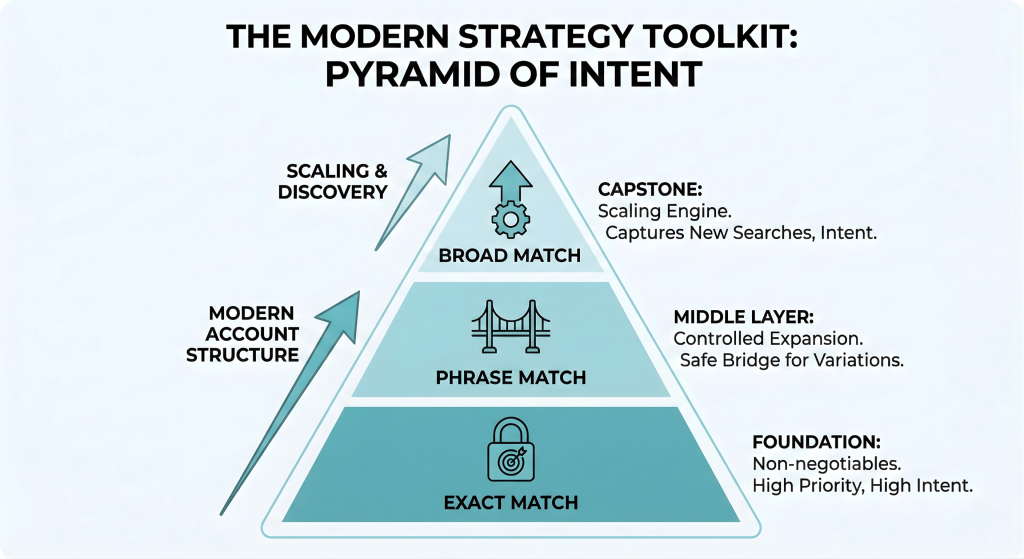
With the technical mechanics understood, the question becomes: how do we structure an account today? We no longer build SKAGs (Single Keyword Ad Groups). Instead, we build a Pyramid of Intent.
- The Foundation: Exact Match. These are your non-negotiables. Use Exact Match for your highest-converting, high-intent terms where you need absolute budget priority. If you sell “CRM software,” bid aggressively here to ensure 100% Impression Share on the terms that directly drive revenue.
- The Middle Layer: Phrase Match. Use this for controlled expansion. It is ideal for mid-funnel terms where context matters, but you want to capture slight variations. It serves as a safe bridge, capturing volume without the volatility of broad match, often acting as a proving ground for new keywords before they are promoted to Exact.
- The Capstone: Broad Match. This is your scaling engine. Once your Exact and Phrase layers are profitable, layer on Broad Match combined with Smart Bidding. This layer captures the 15% of daily searches that are brand new, queries you could never predict or build a list for. It allows the AI to find customers who display the intent to buy, even if they don’t use your specific vocabulary.
Vertical-Specific Nuance:
- For B2B: Broad match can be dangerous if not tamed. You must pair it with Value-Based Bidding (VBB) or Offline Conversion Tracking (OCT). Without VBB, Broad Match will happily find you cheap “student” or “career” queries because they are semantically related. By training the model on qualified leads (not just form fills), you teach Broad Match to ignore low-quality volume.
- For E-commerce: Volume is king. With thousands of SKUs, manual lists fail. Broad Match is essential here to capture long-tail product variations (e.g., “red sneakers size 10 for wide feet”). Use it to feed your shopping feeds and capture intent that specific keywords miss.
Monitoring and Optimization
Automation does not imply abdication. The Search Terms Report remains your primary diagnostic tool. Review it weekly; not to micromanage, but to spot intent mismatches. If the AI incorrectly maps your B2B software keyword to a “student login” query, immediate negative keyword negation is required to stop the bleed.
This analysis is also your primary research tool. It is the most reliable method for learning how to find long-tail keywords that your competitors might be missing. By elevating these specific terms from Broad to Exact match, you secure cheaper CPCs and higher relevance.
Don’t let Quality Score myths deter you. Using Broad Match does not inherently penalize your score. Google calculates Quality Score based on the relevance of the query to the ad, regardless of the match type used to enter the auction.
Finally, validate, don’t guess. Use Custom Experiments to rigorously test Broad Match. Set up a 50/50 split: your control arm running legacy match types, and your experiment arm running Broad Match with Smart Bidding. If the experiment drives incremental conversions at a stable ROAS, you have mathematical proof to scale.
From Keyword Manager to AI Strategist
The role of a PPC manager has fundamentally changed. We are no longer mechanics tightening bolts on exact match keywords; we are architects designing systems for AI. Your value is no longer defined by how well you manage character strings, but by how well you manage signals, feeding the algorithm better conversion data, and creative, feeding the user better messaging.
Success in this new landscape requires a shift in mindset. You must trust the machine to handle the matching while you focus on the guarding. Give the AI the right goal (Smart Bidding), the right boundaries (Negative Keywords), and the freedom to find performance where you least expect it. That is the definition of modern search strategy.
Frequently Asked Questions (FAQ)
What are the four keyword match types for SEM?
Historically, there were four match types, but Google retired the “Broad Match Modifier” (BMM) in 2021. Today, there are three positive match types: Broad Match, Phrase Match, and Exact Match. The “fourth” critical component is Negative Keywords, which are used to exclude traffic and function as a vital guardrail for modern campaigns.
What is keyword matching?
Keyword matching is the algorithmic process search engines use to connect a user’s search query to an advertiser’s keyword list. In the past, this was done by matching literal text strings (syntax). Today, it is done by matching the user’s intent (semantics), allowing ads to appear for relevant queries even if they do not contain the exact words in the keyword list.
What keyword match type gives smart bidding?
Smart Bidding is an automated bidding strategy, not a match type, but it is mandatory for Broad Match. While you can use Smart Bidding with Exact and Phrase match, its synergy is most powerful with Broad Match. Broad Match provides the volume and signals, while Smart Bidding analyzes those signals to bid only on the queries likely to convert.
What are the different types of negative keyword match?
Unlike positive keywords, negative keywords still rely on strict syntax. There are three types:
- Negative Broad: Excludes the query if it contains all your negative terms, regardless of order.
- Negative Phrase: Excludes the query only if it contains the exact keyword phrase in the exact order.
- Negative Exact: Excludes the query only if it matches the negative keyword exactly, with no extra words.
What are keyword match types with examples?
Here is a breakdown using the keyword “running shoes”:
- Broad Match: running shoes — Matches “buy sneakers,” “marathon footwear,” or “running store” (Focus: Related Intent).
- Phrase Match: “running shoes” — Matches “best running shoes for men” or “red running shoes” (Focus: Includes Meaning).
- Exact Match: [running shoes] — Matches “running shoes” or “shoes for running” (Focus: Same Intent).
Author:

Get 3x more revenue from the same ad spend.
Let our onboarding experts show you the power of AI-driven PPC optimization.
Start scaling today
Popular Posts
-
 How Many Keywords Should Be In an Ad Group in Google Ads?
For the vast majority of modern campaigns, the ideal number…
Read more -
 Google Ads Script for Dummies: An Introduction
Imagine you have an e-commerce website that sells licensed superhero…
Read more -
Google Ads Sitelink Character Limits
Your Google Ads are cutting off in the middle of…
Read more -
What Is Conversion Value in Google Ads?
What if you could put a price tag on every…
Read more

Register for our Free 14-day Trial now!
No credit card required, cancel anytime.