Budget Tracking
Unified spend control across ad platforms
Connect your ad accounts and let Adsbot consolidate your spend from Google, Meta, TikTok, LinkedIn, and Microsoft Ads into one clear view. Stop logging into five different dashboards to check your pacing. Get a live, predictive visualization of your total marketing budget in seconds.

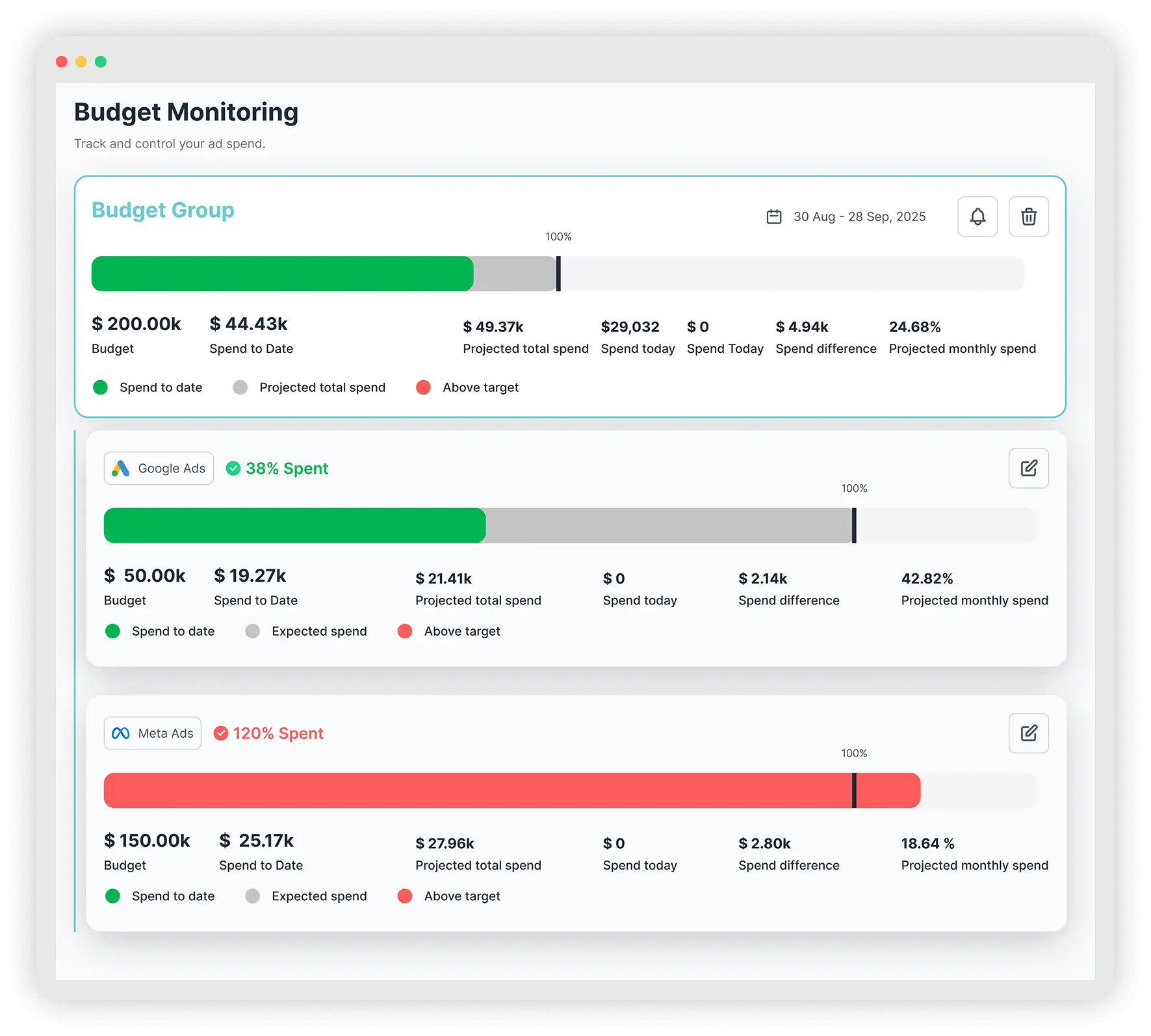







Built for Performance Teams & Marketing Agencies
- Eliminate Overspend Surprises Instantly.
- Forecast End-of-Month Costs Automatically.
- Consolidate Cross-Platform Spend in Real-Time.
- Combine Multiple Ad Accounts into a Single Tracking With Budget Groups.
Precise Filters
Track Exactly What Matters, With Precision.
Generic account-level tracking is insufficient for complex agency structures. Use our advanced Filtering Logic to slice your budget tracking with surgical precision. Don't just track the whole account; track the segments that impact your goals by filtering budget groups by Campaign, Labels, or even Device Type. Whether you are setting a quarterly budget for a specific initiative like 'Q4 Lead Gen' or a short-term cap for 'Black Friday,' you define the parameters. We monitor the pace against your custom caps in real-time, handing you the clarity to see your total marketing health at a glance.
Flexible control for complex accounts.


Frequently Asked Questions
Our system integrates with all major ad platforms (including Microsoft and LinkedIn) to visualize your combined spend in real-time, replacing manual data entry with automated precision.
Adsbot allows you to create Budget Groups filtered by specific Campaign Labels or Campaign Types, ensuring you are tracking the budget for a specific product launch or strategy, not just the entire account.
Yes. Unlike standard dashboards that show past data, Adsbot uses “Projected Total Spend” metrics. We analyze your current spending velocity to predict your final month-end cost, alerting you to potential overspend days or weeks before it happens.
Absolutely. With Budget Groups, you can combine a Google Ads account, a Meta Ad account, and a TikTok Ad account into a single “Group” with one total budget cap. This is essential for agencies managing holistic client budgets rather than channel-specific allowances.
To monitor daily ad pacing with Adsbot, simply head to the Budget Monitoring tab. Our visual progress bars turn Red when you are over-pacing and Green when you are on track, while our data columns show you the exact “Spend to Date” versus “Projected Spend” for instant verification.
Still not convinced?
Register for our Free 14-day Trial now!
No credit card required, cancel anytime.
Try Adsbot