Google Ads Optimization Tool
One-Click Optimization For Google Ads
Are your Google Ads campaigns underperforming? You're not alone - 70% of advertisers are leaving money on the table, bleeding valuable budgets on poorly optimized ads. Imagine logging into your account tomorrow morning and seeing your ROI boosted, cost-per-click slashed, and your workload cut in half with Adsbot.






Potential Search Terms
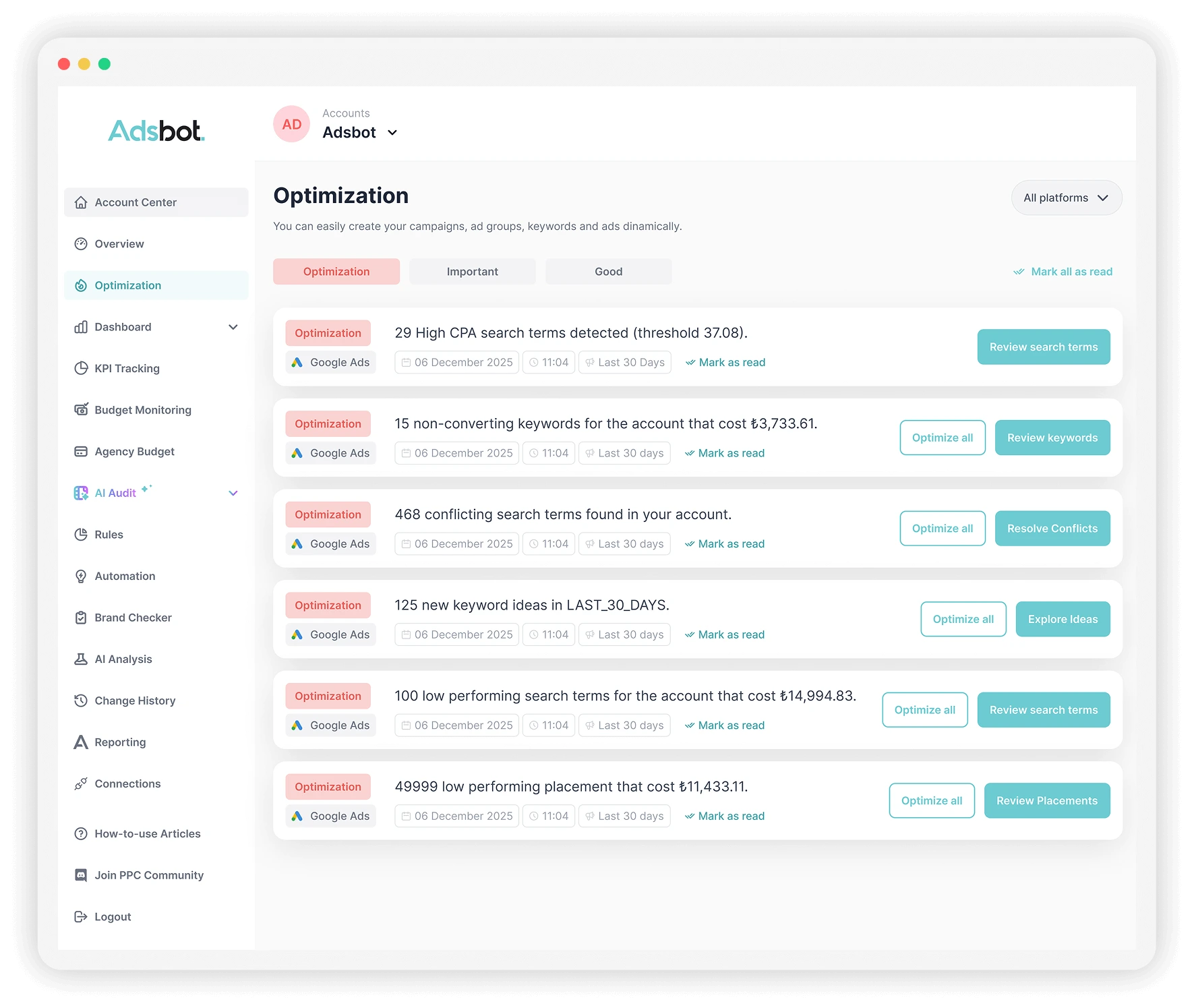
This optimization is your account's built-in growth engine, digging through your Search Term Report to find gold. It identifies specific queries users have typed that are already getting impressions and clicks, but which you haven't added as actual keywords yet. These are proven, high-intent searches that are currently just triggering your broad match keywords.
Adsbot lists these "Potential Search Terms" for you to review. The best part is the direct action: right from this interface, you can add the winners directly into the right ad groups, likely as a phrase or exact match. This change is pushed straight to Google Ads, stopping them from being caught by random broad matches and letting you take precise control over them.

High CPA Search Terms
This optimization is for fine-tuning an account that's already working but needs to be more profitable. This report drills down past the keyword level, analyzing the specific search terms that trigger your ads. It finds specific user queries that do convert, but at a Cost Per Acquisition (CPA) that is much higher than your account's target. A single "good" keyword can often be triggered by a mix of cheap, profitable search terms and a few very expensive ones.
Adsbot flags these expensive search terms for you. Instead of pausing the entire profitable keyword, you can add just these specific, high-CPA search terms as negative keywords with one click in Adsbot. This change is pushed directly to Google Ads, acting like precision surgery for your ad groups: you keep the profitable traffic while cutting out the inefficient queries that were dragging down performance.

Non-Converting Keywords
This is the most direct way to cut waste. This rule creates a simple, brutal list of every keyword that has spent a significant amount of money without generating a single conversion. Worse than just having a "high CPA," these are "zombie" keywords that are doing nothing but eating your budget. The report shows you exactly how much each keyword has cost you for zero return.
The "Non-Converting Keywords" report is a simple hit list. It shows the total amount of money you've wasted and gives you a one-click solution. Right from the Adsbot dashboard, you can select all the keywords on this list and pause them instantly. Adsbot pushes this change to your ad account, immediately trimming the fat and reallocating that wasted budget.

Low-Performing Placement
This is a critical money-saver for anyone running Display or YouTube campaigns. The "Negative Placement Ideas" rule scans your accounts for specific websites, YouTube channels, or mobile apps that are eating your budget without delivering any results. These are placements with high costs but no conversions, essentially acting as a drain on your ad spend.
Adsbot identifies these wasteful placements and shows you the "Total Potential Savings." From the dashboard, you can review the list and, with a single click, add them directly to your account's negative placement list. Adsbot pushes this change to Google Ads for you, immediately stopping your ads from appearing on those low-quality sites or apps.

Low-Performing Search Terms
Think of this as your automated budget defense. The "Negative Keyword Ideas" rule constantly scans your Search Term Reports to find queries that are irrelevant and wasting your money. These are searches that trigger your ads but have zero chance of converting. Think users looking for a different product, "free" versions, or job-seekers.
Adsbot shows you the exact term, the keyword it matched to, and how much it has cost you. Instead of exporting a list, you can take action right there. Just select the irrelevant terms and add them as negative keywords directly from the Adsbot interface, instantly plugging the leaks in your campaign budget.

Conflicting Search Terms
This is an advanced PPC optimization that solves a problem most managers don't even know they have. A "Search Term Conflict" happens when a user's query triggers an ad from the wrong ad group; often, a generic, broad match keyword instead of the specific, exact match keyword you created for that exact search. This mistake kills your Quality Score, lowers your click-through rate, and wastes money on a higher cost-per-click.
Adsbot automatically detects these conflicts and gives you the option to fix them on the spot. You can add the search term as a negative keyword to the incorrect ad group right within Adsbot. This action "sculpts" the traffic, forcing Google to show the ad from the correct, hyper-relevant ad group you built for it, instantly improving your account's efficiency.

Frequently Asked Questions
Google Ads optimization tools boost your ad campaigns using advanced AI and machine learning strategies. It helps you examine and manage your ad budget with valuable insights created specifically for your campaigns. In addition, tools such as Brand Checker, URL Checker, and Quality Score Checker allow you to monitor your campaigns’ possible problems, including low ad scores, slow-loading URLs, and competitors’ keyword bidding.
Adsbot is a software program that automates your marketing campaigns. We help our clients optimise ads by offering comprehensive data analysis and ad optimization tools. These tools, such as Ad Group Cost Control, which helps keep one ad group from consuming more than half of the overall budget, are your best friends on your advertisement journey. By automating these tedious tasks and providing valuable and data-driven insights, Adsbot allows you to take initiative with informed decisions. Start your journey with Adsbot to boost your ROI and optimize your ad performance.
This is where AI Google Ads management becomes practical. Instead of just being another dashboard, Adsbot acts as an analytical partner. The platform uses its intelligence to sift through mountains of performance data, distinguishing it from simpler Google Ads AI tools. This approach to AI Google Ads management means you get alerts that matter, helping you focus on the 20% of optimizations that will drive 80% of your results.
The benefits of using optimization tools include improved budget and spend management, optimization score estimates, web analytics insights, improved SEO and PPC performance, personalized recommendations for reaching an optimization score of 100%, and actionable tips for rectifying any issues. Adsbot is a software that uses the latest in artificial intelligence (AI) and machine learning technology to provide users with an estimate of how well their Google Ads account is set to perform. Ads Software also offers insights into budget and spend, as well as web analytics data to help improve campaign performance.
Adsbot assists in optimizing advertisements, campaigns, and placements. It is designed to reduce the effort required to maintain and enhance campaigns dramatically. Users can employ Adsbot to identify poorly performing keywords or to detect poorly placed advertisements, subsequently taking steps to improve them. Advertisers can position their ads in locations where they will receive greater visibility. Additionally, Adsbot performs quick assessments to pinpoint areas where time and financial resources can be saved within campaigns.
This is really where AI for Google Ads moves from a buzzword to a practical tool. While many AI tools for Google Ads just dump data on you, effective Google Ads AI software like Adsbot helps you use that data. The system’s intelligent analytics, which are part of our AI Google Ads optimization toolkit, spot complex patterns a human would miss (like an ad group that’s secretly eating your budget or a new search term that’s about to trend). This intelligent layer helps you make smarter, faster decisions without needing to be a data scientist.
To optimize Google Ads, start with in-depth keyword research to identify relevant and high-performing terms. Use negative keywords to exclude irrelevant searches. Craft compelling ad copy that aligns with user intent and includes targeted keywords. Regularly adjust bids to ensure competitive positioning and maximize ROI. Utilize ad extensions to provide additional information and enhance ad visibility. Monitor performance metrics and conduct A/B testing to refine your ads continuously. Adsbot is highly effective in implementing the described optimization steps. Consistent optimization efforts will result in an improved ad performance and higher return on investment. Now you know how to optimise your Google Ads using Adsbot!
Still not convinced?
Register for our Free 14-day Trial now!
No credit card required, cancel anytime.
Try Adsbot